The stack at a glance
What amapas353.com is built from — every service, what it does for the site, what lives inside it, and where its console is.
What this guide covers
amapas353.com is the direct-booking website for Amapas 353, Unit 21 in Puerto Vallarta — one condo, rented either as a Two Bedroom or as a One Bedroom — and the owners’ admin area behind it. Guests book here instead of through Airbnb: they pick dates, see the price, and send a request that holds their card. An owner approves or declines it in admin, and only then is the card charged.
This card is the technical tour: which service does what, how a booking and a price travel through them, how email moves, how admin is guarded, and how a change reaches the live site. Two other guides sit alongside it:
- Amapas 353 Competitive Price Agent, on this shelf — the Python tool that reads competitors’ Airbnb prices.
- The User Guide inside admin (the menu’s User Guide) — the owners’ screen-by-screen manual. It joins this shelf as Amapas 353 Website & Admin once the site settles.
The map
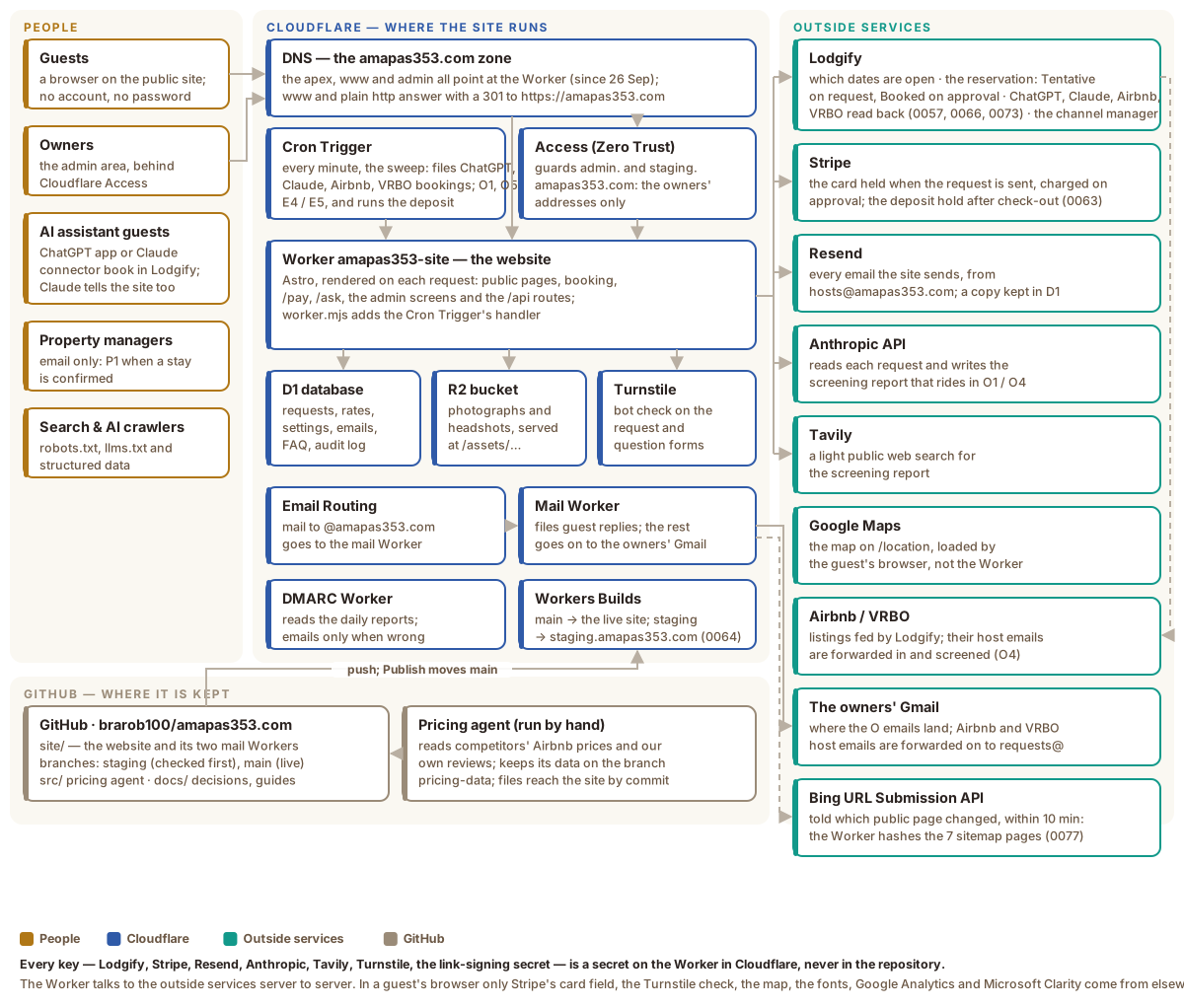
Gold is people, blue is Cloudflare, green is the outside services, brown is GitHub. Every arrow out of the Worker to the right is a server-to-server call made with a key the Worker holds as a secret. Nothing in a guest’s browser holds a key.
Where the domain stands today (26 September 2026)
- amapas353.com — the new site, since 26 September 2026 (Launch Book step 21): a Custom Domain of the Worker. The emails’ links, the canonical tags and the sitemap all name it.
- www.amapas353.com — on the Worker. Every path except
/adminanswers with a permanent redirect (301) to the same path on amapas353.com. - admin.amapas353.com — the admin area, on the Worker, behind Cloudflare
Access.
/adminon the other two addresses leads here. - Redirects — plain http goes to https, and the old Lodgify website’s page
addresses (
/en/…) go to the page that replaced each, in one hop. - The old Lodgify website — still published, reachable only through Lodgify, until the guest walk-through (step 22) passes; it is the way back.
- Payments — Stripe is on live keys: real cards are held and charged.
- Email — live both ways: sending through Resend, receiving through Cloudflare Email Routing.
Every service, what it does, and where its console is
On Cloudflare
| Service | What it does for the site | Console |
|---|---|---|
Worker amapas353-site | The website itself: an Astro app rendered on each request. The public pages, the booking flow, /pay, /ask, every admin screen and every /api route run here. Its entry file, worker.mjs, also answers the Cron Trigger. | Settings — Variables and Secrets are here |
| Workers Builds | Builds the site/ folder: every push to staging deploys the staging Worker, and every move of main (Admin → Publish) deploys the live one. A failed build leaves the last good version live. | The same Worker’s page |
Worker amapas353-site-staging | Staging (decision 0064): the same site at staging.amapas353.com, with its own database and photo bucket, behind Access on every page. Its emails go only to the owners, it takes Stripe test cards only, and it never writes to Lodgify. The account is on the Workers Paid plan (since 2026-10-15): the free plan allows 10 ms of CPU per run, and the site’s pages and sweeps need more. | Workers & Pages |
| GitHub | Holds the code; Admin → Publish reads what staging has that main lacks and moves main forward. | The repository |
| Cron Trigger | Fires every minute on the live site and every five minutes on staging (declared in site/wrangler.jsonc) and runs the site’s sweep: bookings the ChatGPT app made (every two minutes), the O1 owner email once its screening report is ready, O5 reminders, the E4 and E5 arrival emails, and the security deposit’s hold, reminder and release. | — |
| D1 | The site’s SQLite database, whose home is Cloudflare’s Western Europe region; with read replication on, every page reads from the nearest copy and every save goes to the home copy, in one session per request (decision 0076). It holds: requests and questions, rates and seasons, settings, email templates and the outbox, reviews, the FAQ, photo placements, anonymous page-flow events and the audit log. The site creates its own tables from site/schema.sql the first time it runs against an empty database. | Bound as DB — no walked link yet |
| R2 | Storage for the photographs the owners upload and for guests’ review headshots, served by the Worker at /assets/…. | Bound as PHOTOS — no walked link yet |
| Access (Zero Trust) | Guards admin.amapas353.com, and all of staging.amapas353.com: only the addresses on the Amapas owners policy get through. The same team guards traveller.org’s admin and this shelf. The Worker checks Access’s signed token on every admin request as well. | Zero Trust |
| Turnstile | The invisible bot check on the booking request and on the ask-the-owners form. | Turnstile |
| DNS | The amapas353.com zone, on Cloudflare since 12 September 2026. www and admin are Custom Domains of the Worker, declared in site/wrangler.jsonc, not added by hand. | DNS records — per zone: choose amapas353.com |
| Email Routing | Receives the domain’s mail. Named addresses forward to the owners, dmarc@ goes to the DMARC Worker, and everything else goes to the mail Worker. | Routing rules — per zone |
Worker amapas353-mail | The catch-all. Files a guest’s reply against the booking or question it answers and tells the owners (O3); screens the Airbnb and VRBO host emails the owners forward (O4); passes anything else on untouched. It deploys from its own Workers Builds project. | Worker |
Worker amapas353-dmarc | Reads the daily DMARC reports and writes to the owners only when one shows mail failing to prove it came from amapas353.com. | Worker |
Outside Cloudflare
| Service | What it does for the site | Console |
|---|---|---|
| Lodgify | The calendar every channel shares: Airbnb, VRBO, the ChatGPT app and this site. The Worker asks it which nights are closed. With Hold the dates in Lodgify switched on in Settings, a request holds its dates there as Tentative, approval makes them Booked, a decline or cancellation frees them, and moving a confirmed stay to new dates books a new reservation for them and removes the old one (decision 0062). It carries the bookings the ChatGPT app makes, which the sweep reads back, and it keeps Airbnb and VRBO in step. A VRBO or Airbnb stay’s price breakdown — rent, cleaning, taxes, total, paid, due — is read from it when the stay’s booking page opens (decision 0078), and every past booking is read when an owner imports past guests into the Email DB (decision 0079). It does not set the site’s prices (decision 0060). | app.lodgify.com |
| Stripe | Card payments. A request holds the guest’s card without charging it; Approve charges it; Decline releases it; refunds are issued from admin. Each charge’s fees — Stripe’s, and Lodgify’s on a VRBO charge run through Lodgify — are read back from Stripe so admin shows the net to the owners (decision 0078). ChatGPT-app guests pay on a /pay page. When switched on, a security deposit hold goes on the same card on check-out day and is released three days later, or charged for damage from admin (decision 0063). Called over plain HTTPS, with no Stripe library. | API keys · Payments |
| Resend | Sends every email, from hosts@amapas353.com. Each one is also written to the outbox in D1, so admin can show what went and when. A marketing message from Email DB is queued and sent a few copies a minute by the scheduled sweep, each with the guest’s own unsubscribe link and the one-click unsubscribe header mail apps show (decision 0079). | resend.com (sign in) |
| Anthropic API | Writes the screening report on each request and on each forwarded platform booking: who the guest appears to be and anything worth a second look. The report rides in O1 or O4 and on the request’s page in admin. | console.anthropic.com (sign in) |
| Tavily | The screening report’s public-presence search, only when it has a full name and a city: the name and city, the same with LinkedIn, the name with the guest’s work email domain when they booked from one, and the name and city with Facebook and Instagram. What it finds enters the report marked unverified; a current job and employer appear as its Work line, and name-matched social profiles as bare links. | tavily.com (sign in) |
| Google Maps | The map on /location, embedded without a key and loaded by the guest’s browser. | — |
| Google Fonts | The site’s two typefaces, loaded by the browser. | — |
| Google Analytics 4 | Visit counts on every public page (not admin), from the owners’ Google tag. Loaded by the guest’s browser; the page address it receives has any private-link token and Stripe’s return details removed. | analytics.google.com (sign in) |
| Microsoft Clarity | Recordings and heatmaps of how guests move through the public pages, from the owners’ Clarity project. Loaded by the guest’s browser; never on a guest’s private pages (payment, finish-booking, reply, deposit, unsubscribe, request received) or on staging, and the booking and question forms are masked so nothing typed is recorded (decision 0033 addendum). | clarity.microsoft.com (sign in) |
| Bing URL Submission API | How Bing hears which public page changed: the Worker checks the seven sitemap pages every ten minutes and sends only the changed ones, with the owner’s Bing Webmaster Tools key. The shared IndexNow endpoints refuse Cloudflare’s addresses, so this is the sender (decision 0077 and addenda). Google does not take part; it reads the sitemap. Managed on Admin → Publish → Search engines. | Bing Webmaster Tools (sign in) |
| The ChatGPT app | A separate app with its own repository (brarob100/amapas-353) that books straight into Lodgify. The site never changes it; it reads the bookings it makes. | — |
In GitHub
| What | What it holds | Where |
|---|---|---|
| The repository | site/ — the website, its two mail Workers (site/mail, site/dmarc) and wrangler.jsonc; src/ — the pricing agent; docs/ — decisions, the runbook, diagrams and these guides. | brarob100/amapas353.com |
| The pricing agent | A Python command-line tool, run by hand. It reads competitors’ Airbnb prices into its own database, kept on a branch of the repository of its own (pricing-data) so its weekly saves never touch the live site, and suggests a One Bedroom rate; it also reads the guest reviews of our own Airbnb listing into a file the site bundles. It never touches the live site directly. | src/amapas_pricing/ — its own card on this shelf |
Keys and settings
Every key lives as a secret on the Worker — the Worker’s Settings, then
Variables and Secrets — and nowhere else: not in the repository and not in
these guides. By name: LODGIFY_API_KEY, STRIPE_SECRET_KEY and
STRIPE_PUBLISHABLE_KEY, RESEND_API_KEY, ANTHROPIC_API_KEY,
TAVILY_AMAPAS, TURNSTILE_SITE_KEY and TURNSTILE_SECRET_KEY,
LINK_SIGNING_SECRET (it signs the links in guests’ emails) and
ADMIN_PREVIEW_TOKEN (a second way into admin the owners have chosen to keep
for now), STAGING_SYNC_TOKEN (on both Workers: it lets staging copy the live
words and settings) and GITHUB_PUBLISH_TOKEN (on the live Worker: the Publish
button) and BING_WEBMASTER_API_KEY (on the live Worker: how a changed page is
sent to Bing, decision 0077). The staging Worker has its own STRIPE_* keys, the test ones only. CF_ACCESS_AUD, the tag that ties the Worker to its Access
application, is set in the same place as plain text.
Values that are not secret — the site’s address, the Access team, the admin
address, the cron schedule, the custom domains, and the database and storage
bindings — live in site/wrangler.jsonc. The file wins on every deploy, so a
change made to those in the dashboard does not survive the next push.
The business settings — prices, fees, taxes, minimum stays, promo codes, the cancellation policy, email wording, who receives which email — are not in code at all. They are rows in D1, changed on admin screens and recorded in the audit log.