Prices and availability
How the Worker turns the Rates page into the price a guest sees, where the open dates come from, and what the pricing agent adds.
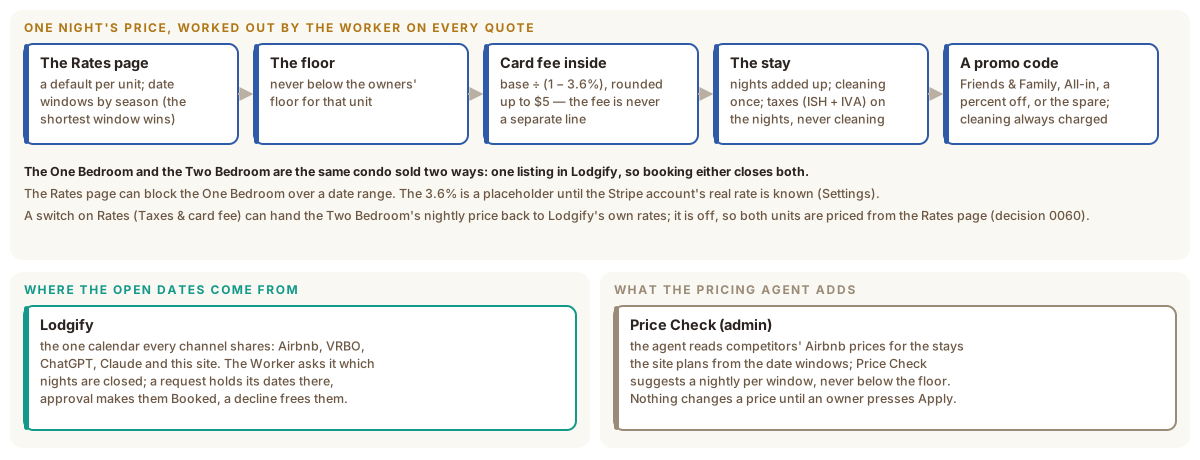
One condo, sold two ways
The condo rents either as a Two Bedroom (sleeps four) or as a One Bedroom (sleeps two, the second bedroom locked). Lodgify has a single listing for it — the Two Bedroom — and the One Bedroom is sold from that same listing (decision 0025). A night booked either way is gone for both.
The price of one night
The Worker works out every price itself, on every quote, from rows in D1 that the owners edit on the Rates page. Nothing about a price is cached from Lodgify or from a spreadsheet.
- The base. Each unit has a default nightly rate. Date windows, grouped by season on the Rates page, override it for their dates; where two windows cover the same night, the shorter one wins, so a holiday week inside a high season takes its own price.
- The floor. The result never goes below the owners’ floor for that unit. Floors are owner-set and are not a tunable (decision 0004).
- The card fee, inside the price. The base is divided by (1 − 3.6%) and rounded up to the next $5, so the card-processing cost is part of the nightly rate and never a separate line. The 3.6% is a placeholder until the Stripe account’s real rate is known (a Settings value; decision 0028).
- The stay. The nights are added up; the cleaning fee is charged once; the lodging taxes (ISH and IVA, both Settings values) apply to the nights and never to cleaning. A stay whose nights fall under two rates shows the average per night and each rate’s nights.
- A promo code, when one is entered: a Friends & Family nightly rate, an All-in nightly rate with the taxes inside it, a percent off, or the spare slot the owners define. Every code still charges cleaning.
The Rates page can also block the One Bedroom over a date range, and it sets each window’s minimum stay. Website guests cannot start a stay sooner than two days from today (a Settings value); the owners can place any dates from admin.
A switch in Settings can hand the Two Bedroom’s nightly price back to Lodgify’s own rates. It is off: both units are priced from the Rates page (decision 0060), and the Rates page’s Compare with Lodgify card shows where the two differ.
Where the open dates come from
Lodgify is the one calendar every channel shares. The Worker asks it which
nights are closed and shows only open ones; the answer is kept for a short
while so a busy calendar does not ask Lodgify on every click. Lodgify’s key and
its exact User-Agent string are both required on every request — Lodgify
allow-lists that string at its edge — and the site is the only thing that
calls Lodgify’s API. /api/health reports whether the last calls succeeded.
What the pricing agent adds
The pricing agent is a separate Python tool in the same repository, run on GitHub. It reads competitors’ prices on Airbnb and keeps the history. The site tells it which stays to search: it works them out from the date windows on Rates (holidays on their own dates, seasons at 3 or 5 nights, six months ahead) and publishes that list, which the run fetches before it starts. The agent’s prices reach admin as a file the site bundles. Price Check turns them into one suggestion per date window, aimed at the highest-priced similar place, and never below the floor. Nothing changes a price until an owner presses Apply there. The agent has its own card on this shelf.