Email in and out
How the site sends every email through Resend, and how mail to the domain is routed — guests' replies filed against their booking, platform emails screened, everything else forwarded.
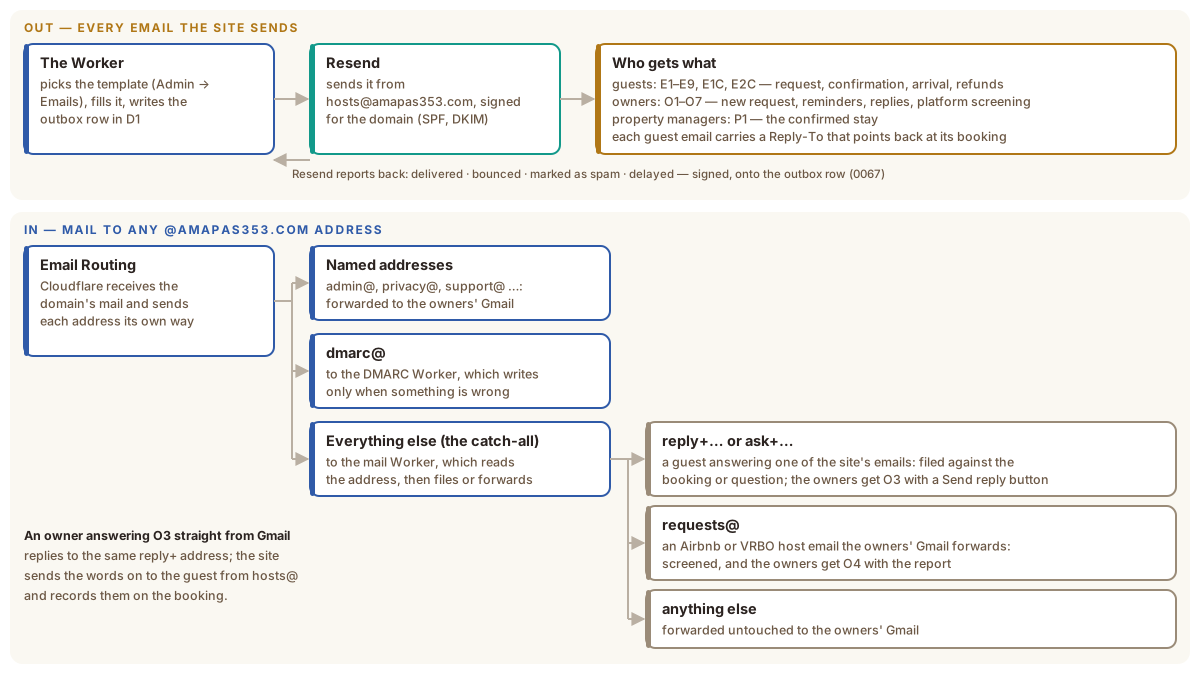
Out: every email the site sends
The Worker picks the template, fills in the booking’s details and sends it through Resend from hosts@amapas353.com. Every email is also written to the outbox table in D1 first, with its status, so admin can show what went and when — and so an email that failed can be seen and sent again.
Resend then reports back. For every email it posts a signed message to the
Worker (/api/mail/resend) the moment the recipient’s server accepts it,
refuses it, delays it, or the recipient marks it as spam. The Worker checks the
signature against a secret only it and Resend hold, remembers each report once,
and writes the result onto the email’s outbox row, which the booking’s
conversation and Emails → Outbox show as delivered, delayed,
bounced, marked as spam or not delivered. Each Worker, live and
staging, has its own webhook and secret; on staging, which sits behind
Cloudflare Access, that one path is let through by an Access bypass so Resend
can reach it — the signature is still its only credential. A staging email
loads its pictures from the live site, because a mail app cannot sign in to
staging to fetch them; its links still lead to staging. Opens and clicks are not tracked: that
would route every link through a tracking address, and opens misreport in
Apple Mail (decision 0067).
The templates live in D1 and are edited on Admin → Emails: each email’s
subject, its headings and body text, the photograph at its top, and a Send
test email button. Merge tags such as {{dates}} or {{cancellation_url}}
are filled in when the email goes.
| Group | Emails | Who |
|---|---|---|
| Guests | E1 request received · E1C (a ChatGPT or Claude booking) · E2 / E2C confirmed · E3 the owners answered a question · E4 two weeks to go · E5 arrival details · E6 canceled · E7 refund · E8 a ChatGPT booking’s payment link · E9 declined · E10 new dates confirmed | The guest |
| Owners | O1 new request (with the screening report) · O2 new question · O3 a guest wrote back · O4 a platform booking screened · O5 still waiting for a decision · O6 a ChatGPT guest paid · O7 a payment link ran out · O8 a background check run from a booking | The owners’ addresses in Settings |
| Property managers | P1 the confirmed stay · P2 the stay moved to new dates | Up to three addresses in Email Settings |
Resend’s DKIM signature and the domain’s SPF and DMARC records live in the
amapas353.com zone. DMARC is at p=none — watching, not enforcing — while the
DMARC Worker confirms nothing legitimate fails.
In: mail to the domain
Cloudflare Email Routing receives every message to @amapas353.com and sends each address its own way:
- Named addresses (
admin@,privacy@,support@and a few others) are forwarded to an owner’s Gmail. dmarc@goes to the DMARC Worker, which reads the daily reports mailbox providers send and writes to the owners only when one shows mail failing to prove it came from amapas353.com — forwarding the report with the alert, since the Worker is the only copy.- Everything else goes to the mail Worker, the catch-all.
The mail Worker
It reads the address a message was sent to:
reply+<code>@orask+<id>@— a guest answering one of the site’s emails, whose Reply-To pointed back at their booking or question. The words are filed in D1 against it, noted in the audit log, and handed to the site, which emails the owners O3 with the message and a Send reply button into admin. When the sender is an owner answering O3 straight from Gmail, the site sends the words on to the guest from hosts@ and records them on the booking.requests@— an Airbnb or VRBO host email that the owners’ Gmail forwards automatically. A booking for our listing is screened and the owners get O4 with the report; anything else is forwarded as plain mail.- Anything else — forwarded untouched to the owners’ Gmail.
When the site cannot take a message, the raw email is forwarded to the owners instead, so nothing is lost and nothing arrives twice. The mail Worker never sends mail of its own; it hands to the site over a private link between the two Workers (a service binding).