A booking, end to end
What each service does, in order, from a guest picking dates to the arrival emails — for a request from the website and for a booking made in the ChatGPT app.
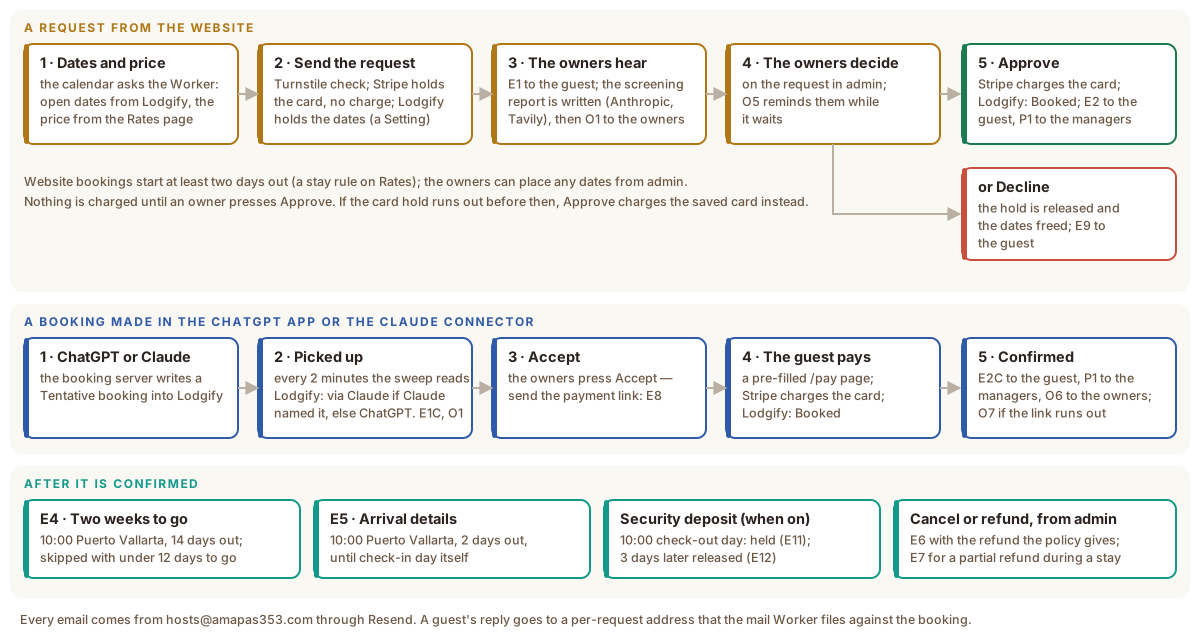
A request from the website
1. Dates and a price
The booking calendar asks the Worker which nights are open (/api/availability)
and what a stay costs (/api/quote). The open nights come from Lodgify, the
calendar every channel shares, so a night booked on Airbnb closes here too. The
price does not come from Lodgify: the Worker works it out from the Rates page
in D1 — see Prices and availability. A guest cannot start a stay sooner
than two days from today (a stay rule on Rates); the owners can place any dates
from admin.
2. The request
The guest fills in the form and presses the button to send it. Three things happen before anything is stored:
- Turnstile confirms a person pressed it.
- Stripe places a hold on the card for the stay’s total. It is a manual-capture payment: the money is reserved, not taken. A Stripe customer is created with it, so the card can still be charged later if the hold runs out before the owners decide.
- Lodgify holds the dates as a Tentative reservation, when Hold the dates in Lodgify is switched on in Settings, so no other channel can sell them while the owners decide.
The request is written to D1 with a short code the guest can quote, and E1 goes to the guest through Resend.
3. The owners hear
The Anthropic API reads the request and writes the screening report, with a public web search from Tavily when there is a full name and a city — who the guest appears to be, and their current job when a professional listing names one. O1 then goes to the owners with the report inside and a button to the request. If the report is not ready within the request’s own time budget (25 seconds), the per-minute sweep finishes it and sends O1 on its next pass — O1 never goes without the report.
4. The owners decide
On the request’s page in admin. While a request waits, the sweep sends O5 reminders (after four hours, then every twelve; both under Booking rules on Bookings).
5a. Approve
- Stripe captures the held payment. If the hold ran out, the saved card is charged instead.
- Lodgify sets the reservation to Booked.
- E2 goes to the guest and P1 to the property managers, when their addresses are filled in on Email Settings.
5b. Decline
- Stripe releases the hold — nothing was ever charged.
- Lodgify frees the dates.
- E9 goes to the guest.
A booking made in the ChatGPT app or in Claude
The ChatGPT app is a separate app, in its own repository, that books straight into Lodgify as a Tentative reservation. The site never changes it; it reads what it makes. The Claude connector, also in its own repository, sends its requests through the ChatGPT app’s booking server, so they reach Lodgify the same way, and nothing in Lodgify tells the two apart: Lodgify keeps no notes from that booking call. So after each real request the connector tells the site itself, with the Lodgify reservation number and the guest’s note, at a private address that only accepts a password the two share.
- Picked up. Every two minutes the sweep asks Lodgify for the bookings that changed since it last looked. One the ChatGPT app made becomes a request marked via ChatGPT or via Claude: E1C to the guest (nothing charged), and O1 to the owners with a screening report, as for any request.
- Accept. The owners press Accept — send the payment link. E8
takes the guest to a
/paypage already filled in with the stay. - Pay. The guest enters a card; Stripe charges it; Lodgify sets the stay to Booked.
- Confirmed. E2C to the guest, P1 to the property managers, O6 to the owners. If the link runs out unpaid (72 hours, a Booking rules value), O7 tells the owners.
To stop the pick-up, switch off Pick up ChatGPT and Claude bookings from Lodgify under Booking rules on Bookings.
A booking made on Airbnb or VRBO
The channels write into Lodgify, the one calendar every channel shares. The site never changes those bookings; it reads them.
- Picked up. Every two minutes the sweep asks Lodgify for the bookings that changed. One a channel confirmed becomes an approved stay marked via VRBO or via Airbnb, with Lodgify’s total and the guest’s details as Lodgify has them.
- Screened. The screening report is written in the background; O4 to the owners carries it (“Confirmed booking”, nothing to approve), P1 to the property managers as for any confirmed stay. Nothing goes to the guest: the channel’s own messages do that, and the address Lodgify holds is usually a platform relay.
- Kept in step. A cancellation or a date change made on the channel reaches Lodgify, and the next read reaches the stay here: cancelled, or on its new dates. Cancelling on the site’s page only marks the site’s record.
To stop the pick-up, switch off Pick up Airbnb and VRBO bookings from Lodgify in Settings.
Once a stay is confirmed
- E4 — Two weeks to go. Sent by the sweep from 10:00 Puerto Vallarta time, 14 days before check-in. A stay confirmed with fewer than 12 days to go skips it.
- E5 — Arrival details. From 10:00, two days before check-in, until the day itself, so a last-minute booking still gets it.
- P4 — Arriving soon, to the property managers. From 10:00, three days before
check-in, until the day itself: the guest’s details again, as P1 gave them. It goes
for Airbnb and VRBO stays too, and only when the booking’s managers’ switch is on.
The sweep marks the stay (
p4_sent_at) before it sends, so it goes once. - Cancel or refund, from admin. Canceling a paid stay refunds what the cancellation policy gives (Booking rules) and sends E6; a partial refund for a problem during the stay sends E7. Every refund is a row in D1, and Stripe returns the money to the card.
- The security deposit (decision 0063), when the owners have switched it
on and the guest agreed to it at checkout:
- At 10:00 on check-out day, the sweep asks Stripe for a second manual-capture hold, $300 by default. It goes on the card the stay was paid with, off-session, meaning without the guest present. The guest gets E11 and the property managers P3, asking them to inspect.
- At 10:00 the day before release, the owners get O10.
- At 10:00 three days after check-out, the sweep cancels the hold and the guest gets E12.
- Damage charged from admin is a partial capture: Stripe takes that much and releases the rest. Anything above the hold is a separate charge on the same card. The guest gets E13.
- When the bank refuses the hold, the guest gets E14, with a link to
/deposit/…to confirm it themselves, and the owners get O9. - The hold goes on at check-out, not check-in: Stripe holds placed without the guest last 4 days 18 hours on Visa.
Each of E4 and E5 goes once: the sweep marks the stay before it sends. Each deposit step is marked the same way.
Links in guests’ emails
The links in guests’ emails — a booking’s page, a finish-booking link, a
payment link — carry a signed token. The Worker checks the signature
(LINK_SIGNING_SECRET) and the token’s expiry before it shows anything, so a
link cannot be guessed or edited into someone else’s booking. A link that has
expired says so and offers the way forward.
Where a guest’s reply goes
Every guest email carries a Reply-To address unique to its booking. A reply reaches the mail Worker, is filed against the booking, and the owners get O3 with a Send reply button — see Email in and out.