The stack, and how it works
What traveller.org is built from — every service, what it does for the site, how a change and a photograph reach the live pages, how the doors are guarded, and where each console is.
What this guide covers
traveller.org is a photographs, journal and banknotes site: thirty years of travel photographs by country and year, the letters home from 1992 and 1993, and a collection of banknotes, each with its own page. It is a static site, built from data files, and behind it sits an admin for the two people who run it: uploaders for photographs, films and scans, editors for the journal and the banknote pages, a Publish button, two insight dashboards, and the manual.
This page is the technical tour: which service does what, how a photograph and a change
travel through them, how email moves, how the doors are guarded, and where to look when
something breaks. The admin’s own manual, behind the sign-in at /admin/docs/, goes
deeper on every one of these; this page is the map it hangs from.
The map
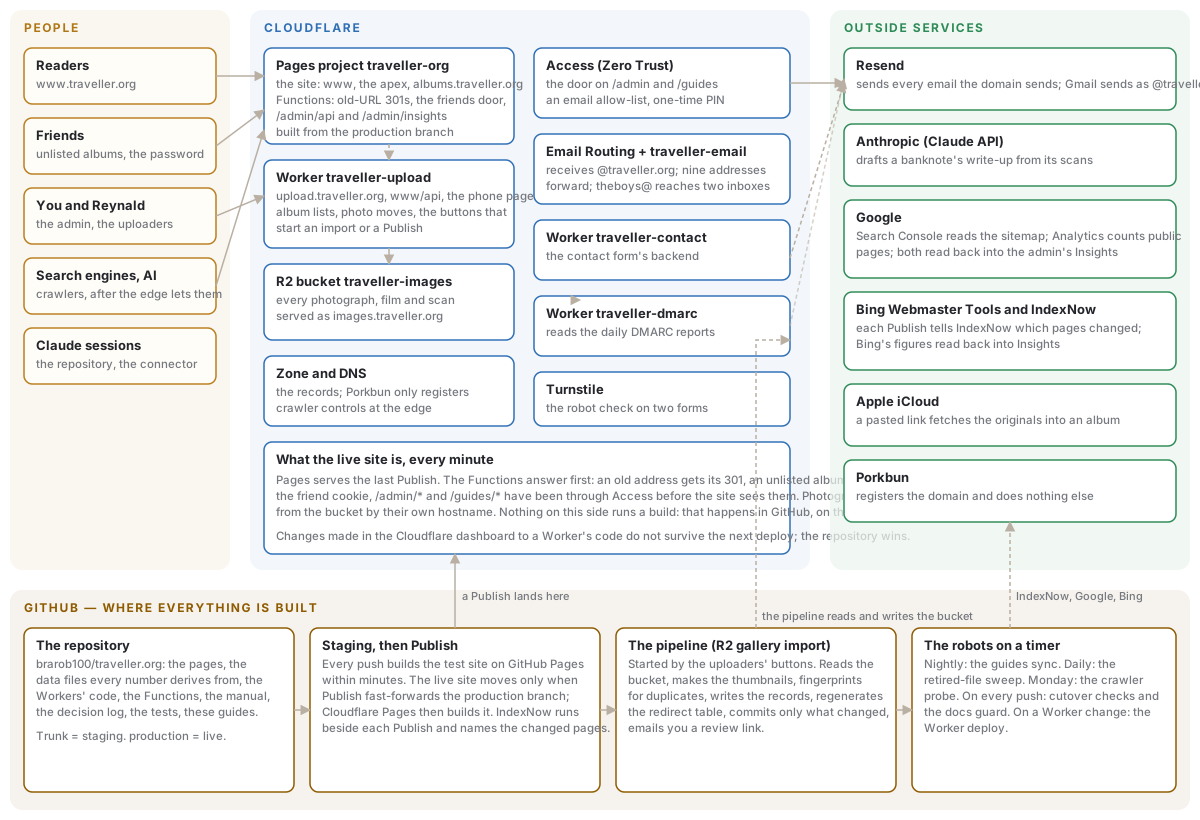
Gold is people, blue is Cloudflare, green is the outside services, brown is GitHub. Nothing on the Cloudflare side runs a build; every build and every import happens in GitHub, and the results land on Cloudflare. No key ever reaches a browser.
Where the domain stands today (14 October 2026)
- www.traveller.org — the live site, on Cloudflare Pages since 19 August 2026, built
from the
productionbranch and current with the last Publish. The baretraveller.organswers with a permanent redirect to www. - albums.traveller.org — every unlisted album on its own hostname, for friends, served by the same build behind the friends door (since 22 September 2026).
- images.traveller.org — every photograph, film and scan, straight from the storage bucket (since 25 September 2026).
- upload.traveller.org — the upload Worker: the desktop and phone uploaders and the machinery behind the admin’s buttons.
- The admin and the guides —
www.traveller.org/admin/and/guides/, each behind its own Cloudflare Access application. - Old addresses — every address the previous site had answers with a true 301 to the page that replaced it, from a table the import regenerates.
- Email — Cloudflare Email Routing receives for the domain; Resend sends.
- Search — IndexNow tells Bing which pages each Publish changed; Google reads the sitemap on its own schedule. Both read back into the admin’s Insights pages.
Every service, what it does, and where its console is
On Cloudflare
| Service | What it does for the site | Console |
|---|---|---|
Pages project traveller-org | The site itself. Builds the production branch on every push to it and serves it on www, the apex and albums.traveller.org. Inside it run the Functions that answer before the pages do: the old-URL redirects, the friends door, the admin’s /admin/api (the signed-in way to the upload Worker) and /admin/insights (the dashboards’ data). Its settings hold the build variables and the door secrets. | Pages project · settings |
Worker traveller-upload | The admin door for machinery. The desktop upload page and the phone page, the album builder, the iCloud-link intake, the album lists every admin picker reads, photo rotate/remove/move/reorder, and the buttons that start an import run or a Publish. Reachable as upload.traveller.org, as /api/* on www, and at its own workers.dev address for the iPhone Shortcut. Deployed from the repository on every change to its file. | Worker |
R2 bucket traveller-images | Every photograph, film and scan: each album’s large images and thumbnails, the films, the banknote scans, a letter’s own photographs, the intake folders, and the pipeline’s fingerprints. Served as images.traveller.org. | Bucket |
| Zone and DNS | The domain’s records, on Cloudflare since 19 August 2026. www and the apex point at the Pages project, albums at the same project, images at the bucket, upload at the Worker; the mail records belong to Email Routing and Resend. Crawler controls live on the zone too: Cloudflare decides which crawlers get in before robots.txt is read. | DNS records · crawler controls (select the zone first) |
| Access (Zero Trust) | The door on the admin and on the guides: two applications, each an email allow-list verified by a one-time PIN. The site also checks Access’s signed pass itself on the admin routes, so a request that reached the site any other way is refused. | Zero Trust |
| The friends door (inside the Pages project) | One shared password opens every unlisted album for a year per device, on www and on the albums site alike. A friend without it can ask from the door: a name and an email behind the robot check, an Approve button in your inbox, a sign-in link in theirs. | Pages settings |
Email Routing + Worker traveller-email | Receives mail for the domain. Nine addresses forward to Gmail; theboys@ goes through the email Worker to two inboxes; dmarc@ goes to the DMARC Worker. | Routing rules (select the zone first) |
Worker traveller-contact | The contact form’s backend: checks the robot token, then emails you the message through Resend. A public endpoint, kept apart from the upload Worker on purpose. | Worker |
Worker traveller-dmarc | Reads the daily DMARC reports and emails you only when something claimed the domain and failed to prove it. Silence means checked and clean. | Worker |
| Turnstile | The “I’m not a robot” check, usually invisible, on the contact form and on the friends door’s ask-for-access card. | Turnstile |
Outside Cloudflare
| Service | What it does for the site | Console |
|---|---|---|
| GitHub | Holds everything and builds everything: the pages, the data files, the Workers’ code, the Functions, the manual, the decision log, the tests and these guides. Its Actions are the build robot and the pipeline (below). | brarob100/traveller.org · Actions |
| Resend | Sends every email the domain sends: the pipeline’s review notices, the contact form, the DMARC alerts, the friends door’s emails, and Gmail’s send-as for the @traveller.org addresses. Several keys, deliberately separate, so any one can be rolled alone. | Resend |
| Anthropic (Claude API) | Drafts the write-up on a banknote’s page from both faces of its scan, for you to edit or regenerate on the Banknote pages screen. | Console |
| Search Console reads the site and its sitemap (registered under the old site’s http name, which the new sitemap kept). Analytics 4 counts the public pages of the live site only, never the admin or the friends pages. Both are read back into the admin’s Insights through a service account. | Search Console · Analytics | |
| Bing Webmaster Tools and IndexNow | Bing’s search console; it reads the sitemap and lists recommendations. IndexNow, since 13 October 2026: after every Publish, a workflow tells IndexNow which pages changed, and through it Bing, Yandex, Seznam, Naver and Yep. The key is public by design, served as a text file at the site’s root. Bing’s figures read back into Insights. | Bing Webmaster Tools · IndexNow runs |
| Apple iCloud | A Copy iCloud Link pasted on either uploader makes the pipeline fetch the originals from Apple straight into the album. It rests on Apple’s undocumented web client, so a probe workflow says when the recipe moves. | — |
| Porkbun | Registers the domain and does nothing else; its nameservers point at Cloudflare. A record created there would never be read. | Porkbun |
How a change reaches the live site
- Everything lands on staging first. Every push to the trunk, whether a session’s edit, an import run’s records or a synced guide, builds the test site on GitHub Pages within minutes. That is where you review.
- Publish is the only way live. The Publish button in the admin (or “publish it” in
a session) fast-forwards the
productionbranch to what staging has. It never half-applies: the live site keeps its old version or gets all of staging. - Cloudflare Pages builds it. The build usually lands in a few minutes, occasionally
much longer with nothing wrong. Every build also writes the sitemap,
robots.txt,llms.txt, the IndexNow key file and a fingerprint of every page. - IndexNow names the changed pages. A workflow started with the Publish compares the fingerprints before and after, waits for the live site to serve the new build, and sends only the pages that are new, changed or gone. A Publish that changes no public page sends nothing, and says so.
- One exception publishes itself. A guide arriving from an app’s own repository goes live on its own, but only when guides are the whole of what is waiting.
How a photograph reaches a page
- Upload. The desktop page, the phone page or the iPhone Shortcut puts the file in the bucket’s intake, named for its country and album. A same-name upload never overwrites by accident.
- One click starts the pipeline. The uploader’s button starts the import workflow in GitHub Actions. It reads the bucket, makes the large image and the thumbnail, fingerprints the photograph so a duplicate is held back rather than published, writes the album’s records, regenerates the old-address table, and commits only what changed, racing nothing.
- You get an email with a review link to the album on staging.
- Publish puts it on www. A photograph you later remove, rotate or move is retired, not deleted: the file stays until neither live site names it, and a daily sweep deletes it then.
Every number the site shows, from a country’s photograph count to a letter’s date range, is derived from those records at build time. Nothing is typed twice.
The doors, and who holds which key
- Readers need nothing. The public pages are open, and so are the files for search engines and AI answer engines.
- Friends have one shared password for the unlisted albums, or a link that signs them in. It opens nothing else.
- The admin is behind Cloudflare Access: an email allow-list and a one-time PIN. On www no admin page asks for anything more; the site checks your pass itself and talks to the upload Worker on your behalf.
- The upload Worker’s own addresses take a passphrase instead, because the iPhone Shortcut cannot sign in. Failed tries are rate-limited.
- Claude sessions work in the repository, and since October 2026 can read the Workers and the buckets through a connector on your Claude account. They cannot read DNS, the Pages project’s settings, Access or Email Routing, and they never deploy by hand.
Keys and settings
Every key lives as a secret where the machinery that uses it runs, and nowhere else: not in the repository and not in these guides.
- On the Pages project: the friends password, the robot check’s secret, Resend’s key for the friends door, the Access audience tags, the upload passphrase for the signed-in route, and the four search-data settings the Insights dashboards read with.
- On the upload Worker: the upload passphrase and a GitHub token that starts workflows.
- On the contact and DMARC Workers: each its own Resend key, and the contact Worker the robot check’s secret.
- In GitHub Actions: the storage credentials the pipeline uses, Resend’s key for its notices, the Cloudflare token that deploys the Workers, the Anthropic key, and the token the guides sync reads the other apps with.
- In the Claude environment: the same four search-data values, for sessions.
The manual’s pipeline page, behind the admin door, has the table of every one with how to roll it.
When something breaks
- The live site looks old. Check the Publish page: is the change still waiting on staging? A Publish moves the branch in seconds; Cloudflare’s build can take longer.
- A photograph is missing or broken. Was it published? Is it retired? The Gallery cleanup screen shows the album as the data has it, and the manual’s pipeline page explains the three image tiers.
- An email did not arrive. Receiving is Email Routing; sending is Resend. A destination that never clicked its verification link silently drops mail.
- The admin asks for a passphrase on www. The signed-in route answers “not switched on” only when its two Pages settings are missing; the page falls back to the passphrase so nobody is locked out.
- A crawler is refused. Cloudflare’s crawler controls on the zone decide that before
robots.txt; the Monday probe workflow goes red when one of fifteen identities is turned away. - A search card in Insights is empty. It names the setting that is missing or quotes the refusal Google or Bing sent, under the cards that stayed blank.
Everything above is documented in more depth in the admin manual, and every decision that shaped it is in the decision log in the repository, with the alternatives that were rejected and why.